> ## Documentation Index
> Fetch the complete documentation index at: https://docs.rimdian.com/llms.txt
> Use this file to discover all available pages before exploring further.
# Create your first app
> Getting started with Rimdian apps development.
The following guide will help you create your first Rimdian private app.
Private apps are same as public apps, except that they are not published to the Rimdian app store. They are meant to be used inside your organization only.
## Introduction
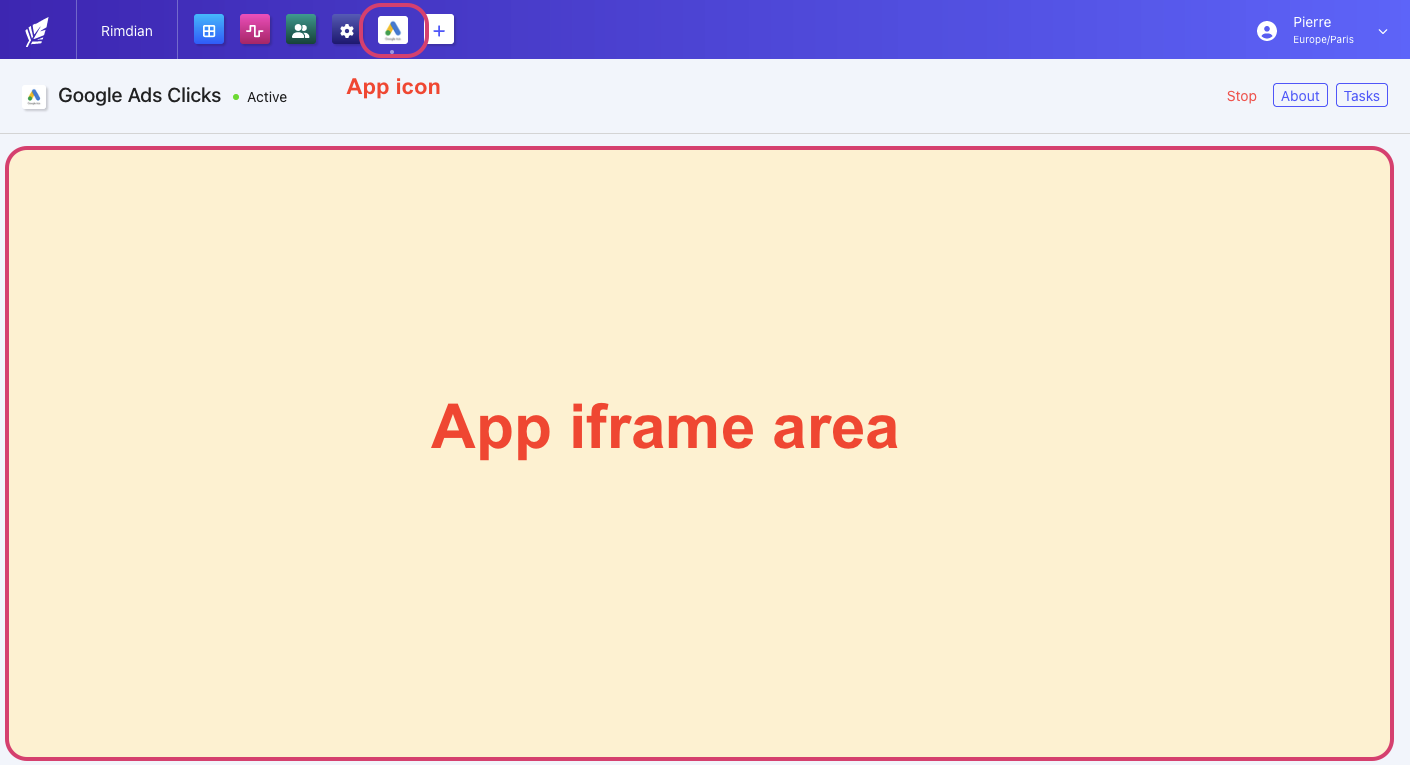
Rimdian apps are web applications that are loaded in an `iframe` inside the Rimdian UI Console.
The app is loaded with a `?token=xxx` URL parameter that is signed by Rimdian with your `APP_SECRET_KEY`. This is how your app can authenticate that it has been loaded by a legit Rimdian parent window.
The app can interact with the Rimdian API using a **Service Account**, which is a special type of `admin` access that has full access to the API.
The app can receive webhooks from Rimdian, such as `tasks` & `data_hooks`, and process them to update the app state & sync data.
Your apps can be hosted anywhere, as long as they are hosted over SSL.
The capabilities of your app are described in a [manifest.json](/apps-development/app-manifest-reference) file that you provide to Rimdian when you create a new private app.
 ## Clone the template
The easiest way to get started with Rimdian app development is to clone the [Rimdian app template](https://github.com/rimdian/app-template) from Github.
The template is a Next.js app that contains the basic structure of a Rimdian app, including an app [manifest.json](/apps-development/app-manifest-reference) example, the app UI, the backend API, and the webhook processing for `tasks` & `data hooks`.
1. Start by cloning the repository and installing the dependencies:
```bash theme={null}
gh repo clone rimdian/app-template
cd app-template
yarn install
```
2. Create a `.env.local` file with the following content:
```bash theme={null}
APP_SECRET_KEY=123
DB_HOST=127.0.0.1
DB_USER=root
DB_PASSWORD=
DB_DATABASE=dev_connected_apps
DB_PORT=3306
```
3. Then, run the development server:
```bash theme={null}
yarn dev
```
## Create a Service Account
To give your app access to the Rimdian API, you need to create a service account in the Rimdian UI Console, at the organization level.
Then, you can use the Service Account email & password to login in order to receive an API `access_token`.
The dev server will start with SSL. You can access the app at [https://localhost:3000](https://localhost:3000).
## App folders architecture
* `manifest.json` - A default app manifest that describes the app and its capabilities.
* `src/pages/api/*` - [API routes](https://nextjs.org/docs/api-routes/introduction) for the backend API. It receives `tasks` & `data_hooks` webhooks from Rimdian.
* `src/app/*` - The app UI that will be loaded in the Rimdian UI Console as an iframe.
* `src/app/app_context.tsx` - React context that reads the `?token=xxx` parameter provided by Rimdian in the iframe URL, and fetches the app config from the API.
* `src/app/page.tsx` - Root page that redirects to the proper screen after loading the `app_context`.
* `src/app/dashboard` - Folder containing the app dashboard when your app is active.
* `src/app/initializing` - Folder containing the app initialization screen where you will collect the Service Account credentials & whatever data required to activate your app.
* `src/app/invalid-token` - Screen showed when the `app_context` fails to fetch your app from the API.
* `src/app/stopped` - Screen showed when your app has been stopped.
* `src/app/components.tsx` - React components used by Rimdian to make your app looking similar.
* `src/app/actions.ts` - [Server actions](https://nextjs.org/docs/app/building-your-application/data-fetching/server-actions-and-mutations) that are be exposed to the app UI, to query the Rimdian API.
* `src/processTasks.ts` - Example of a webhook processing a task described in your `manifest.json`.
* `src/processDataHooks.ts` - Example of a webhook processing a data\_hook described in your `manifest.json`.
* `.env.local` - The environment variables that are used in the app (your secret app key & DB credentials).
## Security
* Your app (iframe) won't load if it's not hosted over SSL.
* Your `APP_SECRET_KEY` should be kept secret and not shared with anyone.
* Your `APP_SECRET_KEY` is used to sign the webhook payloads sent by Rimdian to your app.
* Your `APP_SECRET_KEY` is used to sign the token provided by Rimdian to your iframe, as a URL parameter `?token=xxx`. That's how your app can authenticate that it has been loaded by a legit Rimdian parent window.
* Your private app needs a Service Account to access the Rimdian API. The Service Account email & password should be kept secret and not shared with anyone.
* The Service Account will have full access to the API... that's why private apps should remain private!
## Deploying to Production
The repository contains a `Dockerfile` to build a production image of your app. Don't forget to set the `APP_SECRET_KEY` & other environment variables in your production environment.
### Deploy to Google Cloud Run
The repository also contains a `cloudbuild.yaml` file to deploy your app to Google Cloud Run with a simple `git push`, combined with Google Cloud Build triggers.
You can map your custom domain to Google Cloud Run and it will provision a SSL certificate for you.
The `cloudbuild.yaml` file is configured to name your app `rimdian-app` by default & deploy it in the `europe-west1` region.
In Google Cloud Run, you should set the `APP_SECRET_KEY` environment variable in the "Variables" section of your app in the Google Cloud UI.
## Stack
* [Next.js](https://nextjs.org/)
* [Ant Design](https://ant.design/)
* [TypeScript](https://www.typescriptlang.org/)
* [ESLint](https://eslint.org/)
## Clone the template
The easiest way to get started with Rimdian app development is to clone the [Rimdian app template](https://github.com/rimdian/app-template) from Github.
The template is a Next.js app that contains the basic structure of a Rimdian app, including an app [manifest.json](/apps-development/app-manifest-reference) example, the app UI, the backend API, and the webhook processing for `tasks` & `data hooks`.
1. Start by cloning the repository and installing the dependencies:
```bash theme={null}
gh repo clone rimdian/app-template
cd app-template
yarn install
```
2. Create a `.env.local` file with the following content:
```bash theme={null}
APP_SECRET_KEY=123
DB_HOST=127.0.0.1
DB_USER=root
DB_PASSWORD=
DB_DATABASE=dev_connected_apps
DB_PORT=3306
```
3. Then, run the development server:
```bash theme={null}
yarn dev
```
## Create a Service Account
To give your app access to the Rimdian API, you need to create a service account in the Rimdian UI Console, at the organization level.
Then, you can use the Service Account email & password to login in order to receive an API `access_token`.
The dev server will start with SSL. You can access the app at [https://localhost:3000](https://localhost:3000).
## App folders architecture
* `manifest.json` - A default app manifest that describes the app and its capabilities.
* `src/pages/api/*` - [API routes](https://nextjs.org/docs/api-routes/introduction) for the backend API. It receives `tasks` & `data_hooks` webhooks from Rimdian.
* `src/app/*` - The app UI that will be loaded in the Rimdian UI Console as an iframe.
* `src/app/app_context.tsx` - React context that reads the `?token=xxx` parameter provided by Rimdian in the iframe URL, and fetches the app config from the API.
* `src/app/page.tsx` - Root page that redirects to the proper screen after loading the `app_context`.
* `src/app/dashboard` - Folder containing the app dashboard when your app is active.
* `src/app/initializing` - Folder containing the app initialization screen where you will collect the Service Account credentials & whatever data required to activate your app.
* `src/app/invalid-token` - Screen showed when the `app_context` fails to fetch your app from the API.
* `src/app/stopped` - Screen showed when your app has been stopped.
* `src/app/components.tsx` - React components used by Rimdian to make your app looking similar.
* `src/app/actions.ts` - [Server actions](https://nextjs.org/docs/app/building-your-application/data-fetching/server-actions-and-mutations) that are be exposed to the app UI, to query the Rimdian API.
* `src/processTasks.ts` - Example of a webhook processing a task described in your `manifest.json`.
* `src/processDataHooks.ts` - Example of a webhook processing a data\_hook described in your `manifest.json`.
* `.env.local` - The environment variables that are used in the app (your secret app key & DB credentials).
## Security
* Your app (iframe) won't load if it's not hosted over SSL.
* Your `APP_SECRET_KEY` should be kept secret and not shared with anyone.
* Your `APP_SECRET_KEY` is used to sign the webhook payloads sent by Rimdian to your app.
* Your `APP_SECRET_KEY` is used to sign the token provided by Rimdian to your iframe, as a URL parameter `?token=xxx`. That's how your app can authenticate that it has been loaded by a legit Rimdian parent window.
* Your private app needs a Service Account to access the Rimdian API. The Service Account email & password should be kept secret and not shared with anyone.
* The Service Account will have full access to the API... that's why private apps should remain private!
## Deploying to Production
The repository contains a `Dockerfile` to build a production image of your app. Don't forget to set the `APP_SECRET_KEY` & other environment variables in your production environment.
### Deploy to Google Cloud Run
The repository also contains a `cloudbuild.yaml` file to deploy your app to Google Cloud Run with a simple `git push`, combined with Google Cloud Build triggers.
You can map your custom domain to Google Cloud Run and it will provision a SSL certificate for you.
The `cloudbuild.yaml` file is configured to name your app `rimdian-app` by default & deploy it in the `europe-west1` region.
In Google Cloud Run, you should set the `APP_SECRET_KEY` environment variable in the "Variables" section of your app in the Google Cloud UI.
## Stack
* [Next.js](https://nextjs.org/)
* [Ant Design](https://ant.design/)
* [TypeScript](https://www.typescriptlang.org/)
* [ESLint](https://eslint.org/)