> ## Documentation Index
> Fetch the complete documentation index at: https://docs.rimdian.com/llms.txt
> Use this file to discover all available pages before exploring further.
# Architecture
> Overview of the Rimdian platform architecture
## Platform components
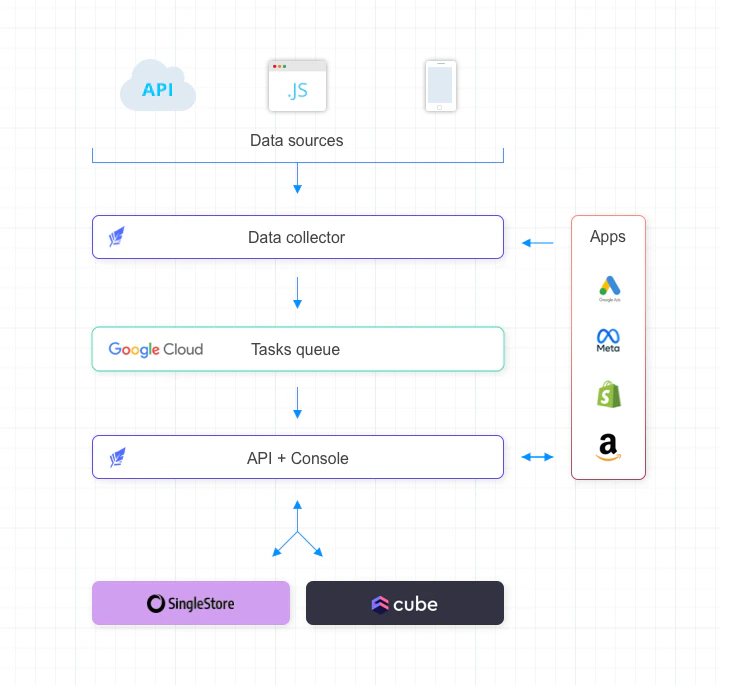 The platform is composed of:
* A data `Collector` - that receives all incoming data (sessions, pageviews, orders etc…) from various sources (website, apps...) and pushes it into the `Queue`.
* A `Queue` - that pushes data into the `API Server` for further processing. It acts as a buffer in case the `API Server` or the `Database` becomes unavailable to avoid loosing data.
* An `API Server` - that receives data from the `Queue` and requests from the `Console` & apps. It interacts with the `Database`.
* A SingleStoreDB `Database` - that stores the data.
* A `Cube Server` - that provides a semantic layer to compute analytics requests.
* A `Console` - for humans, accessible from your browser.
* `Apps` - that can be installed on the platform to extend its capabilities.
## Admins, organizations & workspaces
`Admins` are users who work for your organization & have access to the Rimdian `Console`.
`Users` are visitors & customers who visit your website to buy your products or services.
Admins can belong to many organizations, and each organization can have multiple workspaces.
The data is stored at the `workspace` level.
It's a good practice to create a workspace per environment: test & production
The platform is composed of:
* A data `Collector` - that receives all incoming data (sessions, pageviews, orders etc…) from various sources (website, apps...) and pushes it into the `Queue`.
* A `Queue` - that pushes data into the `API Server` for further processing. It acts as a buffer in case the `API Server` or the `Database` becomes unavailable to avoid loosing data.
* An `API Server` - that receives data from the `Queue` and requests from the `Console` & apps. It interacts with the `Database`.
* A SingleStoreDB `Database` - that stores the data.
* A `Cube Server` - that provides a semantic layer to compute analytics requests.
* A `Console` - for humans, accessible from your browser.
* `Apps` - that can be installed on the platform to extend its capabilities.
## Admins, organizations & workspaces
`Admins` are users who work for your organization & have access to the Rimdian `Console`.
`Users` are visitors & customers who visit your website to buy your products or services.
Admins can belong to many organizations, and each organization can have multiple workspaces.
The data is stored at the `workspace` level.
It's a good practice to create a workspace per environment: test & production