> ## Documentation Index
> Fetch the complete documentation index at: https://docs.rimdian.com/llms.txt
> Use this file to discover all available pages before exploring further.
# User-identity resolution
> Overview of the Rimdian user-identity resolution algorithm
Nowadays it's very common to see 60% of the web traffic coming from mobile phones while 60% of orders are placed from desktops. This is because users are using multiple devices to interact with the same website. This makes it difficult to understand the user journey & measure the performances of marketing campaigns accurately.
User-identity resolution is the process of identifying the same user across multiple devices. This is done by matching the user's data from different devices and creating a single user profile.
There are 2 ways to do that:
* Probabilistically by matching the user IP address etc...
* Deterministically by using unique identifiers like email, phone number, user ID etc...
**Rimdian only does deterministic user-identity resolution using 1st party customer data in accordance with GDPR and CCPA.**
 ## How it works
In Rimdian, a user is defined by a combination of:
* a user `external_id`
* an `is_authenticated` boolean that indicates if that ID is authenticated or not
An "authenticated" user ID is an ID that has been attributed by your database (or eCommerce platform) when the user has logged in.
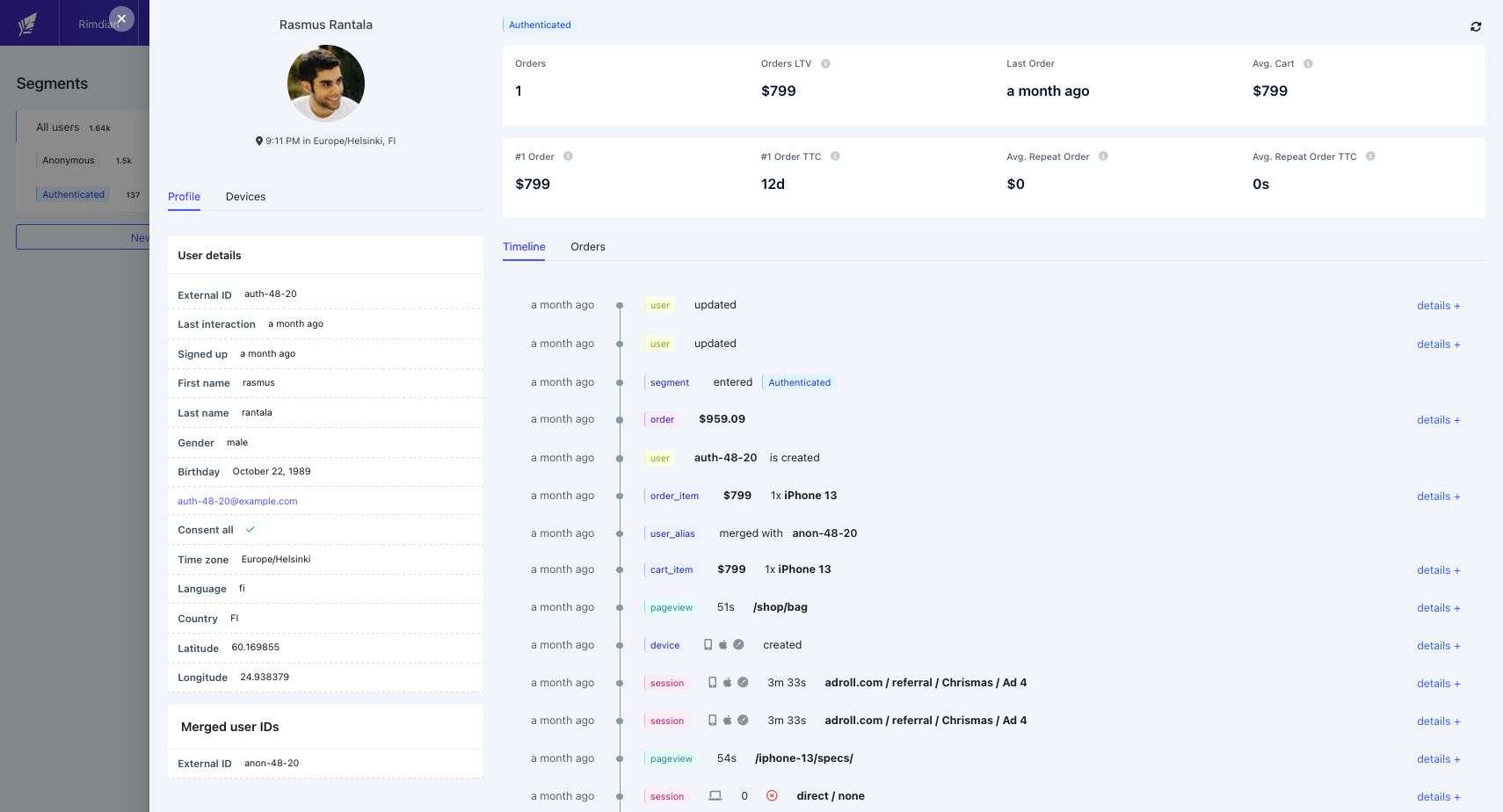
When an anonymous user is visiting your website for the first time, the JavaScript tracker will automatically generate a unique random user ID and store it in a cookie with `is_authenticated: false`. This user ID is then used to track the user's journey across the website.
When the same user authenticates himself into your website (logs in or sign up), we can now associate its previous anonymous ID with the authenticated one provided by your eCommerce platform. The JavaScript tracker takes care of that by sending a `user_alias` event that will trigger a merging of the 2 user profiles.
### Matching other properties
In addition to the user ID, you can also define other properties like **email**, **phone number**... or any custom fields as matching keys.
This is very useful if your users are signing up to your newsletter but are not authenticated yet. In such case you can attach their email address to their anonymous user ID, and as soon as they authenticate themselves with the same email, their user profiles will be merged.
## Merging rules
* An anonymous user ID can be merged into another anonymous user ID.
* An anonymous user ID can be merged into another authenticated user ID.
* An authenticated user ID **cannot** be merged into another authenticated user ID.
* An authenticated user ID **cannot** be merged into another anonymous user ID.
### Merging of user activities & properties
Every time a user profile receives a new property (first name, email, address…), a timestamp is recorded for each value.
When two user profiles are merged together, only the properties with the most recent timestamps are kept.
The activities (pageviews, sessions, events…) from the "source user" are cloned into the "destination user" and the "source user" data is deleted.
Finally, a `user_alias` entry is kept in the database to keep track of the merge.
### Cascading merges
When a user profile has matching keys (email, phone number…) that concern multiple user profiles, the merge will asynchronously push "user\_alias" events to the `Collector` to merge the other matching user profiles.
To make sure the merge takes less than 30secs, only one merge is done at a time. The other merges are queued and executed one after the other.
Example of a cascading merge:
1. An anonymous user A already exists with the email `user_a@website.com`.
2. An anonymous user B already exists with a phone number `+123456789`.
3. An authenticated user C is inserted with the email `user_a@website.com` and the phone number `+123456789`.
4. The user A will be merged into the user C.
5. A `user_alias` event will be sent to the `Collector` to merge the user B into the user C asynchronously.
## How it works
In Rimdian, a user is defined by a combination of:
* a user `external_id`
* an `is_authenticated` boolean that indicates if that ID is authenticated or not
An "authenticated" user ID is an ID that has been attributed by your database (or eCommerce platform) when the user has logged in.
When an anonymous user is visiting your website for the first time, the JavaScript tracker will automatically generate a unique random user ID and store it in a cookie with `is_authenticated: false`. This user ID is then used to track the user's journey across the website.
When the same user authenticates himself into your website (logs in or sign up), we can now associate its previous anonymous ID with the authenticated one provided by your eCommerce platform. The JavaScript tracker takes care of that by sending a `user_alias` event that will trigger a merging of the 2 user profiles.
### Matching other properties
In addition to the user ID, you can also define other properties like **email**, **phone number**... or any custom fields as matching keys.
This is very useful if your users are signing up to your newsletter but are not authenticated yet. In such case you can attach their email address to their anonymous user ID, and as soon as they authenticate themselves with the same email, their user profiles will be merged.
## Merging rules
* An anonymous user ID can be merged into another anonymous user ID.
* An anonymous user ID can be merged into another authenticated user ID.
* An authenticated user ID **cannot** be merged into another authenticated user ID.
* An authenticated user ID **cannot** be merged into another anonymous user ID.
### Merging of user activities & properties
Every time a user profile receives a new property (first name, email, address…), a timestamp is recorded for each value.
When two user profiles are merged together, only the properties with the most recent timestamps are kept.
The activities (pageviews, sessions, events…) from the "source user" are cloned into the "destination user" and the "source user" data is deleted.
Finally, a `user_alias` entry is kept in the database to keep track of the merge.
### Cascading merges
When a user profile has matching keys (email, phone number…) that concern multiple user profiles, the merge will asynchronously push "user\_alias" events to the `Collector` to merge the other matching user profiles.
To make sure the merge takes less than 30secs, only one merge is done at a time. The other merges are queued and executed one after the other.
Example of a cascading merge:
1. An anonymous user A already exists with the email `user_a@website.com`.
2. An anonymous user B already exists with a phone number `+123456789`.
3. An authenticated user C is inserted with the email `user_a@website.com` and the phone number `+123456789`.
4. The user A will be merged into the user C.
5. A `user_alias` event will be sent to the `Collector` to merge the user B into the user C asynchronously.